Hi there. How can we help?
Most answers are one tap away below. If yours isn't here, write to us. A real person reads every message and replies, usually within one business day.
Account & Activation
Unlocking Premium with the email you paid with.
How do I activate Premium after paying on the web? +
Your Premium is tied to the email address you used at checkout. There are two ways to unlock it.
Open the activation link in your payment confirmation email, or tap Get the app at the top of this page. Lensie installs and opens straight on the activation screen. Enter your checkout email and Premium unlocks.
On a computer? You can also activate Premium in your browser at studio.lensie.ai/activate.
-
 1
1Download and open Lensie from the App Store.
-
 2
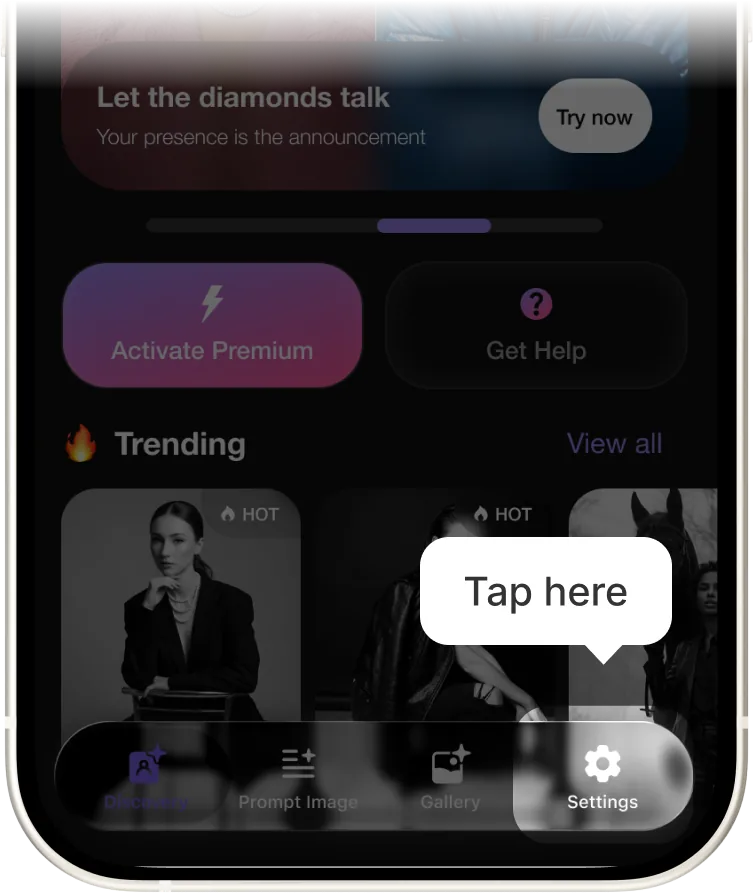
2Tap the Settings icon in the tab bar.
-
 3
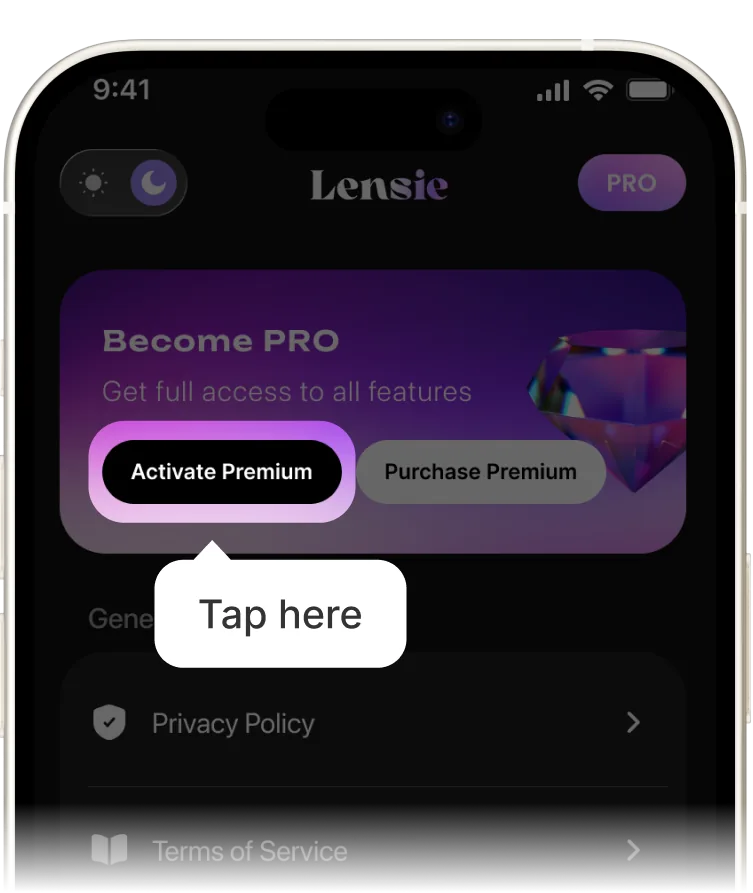
3Tap Activate Premium.
-
 4
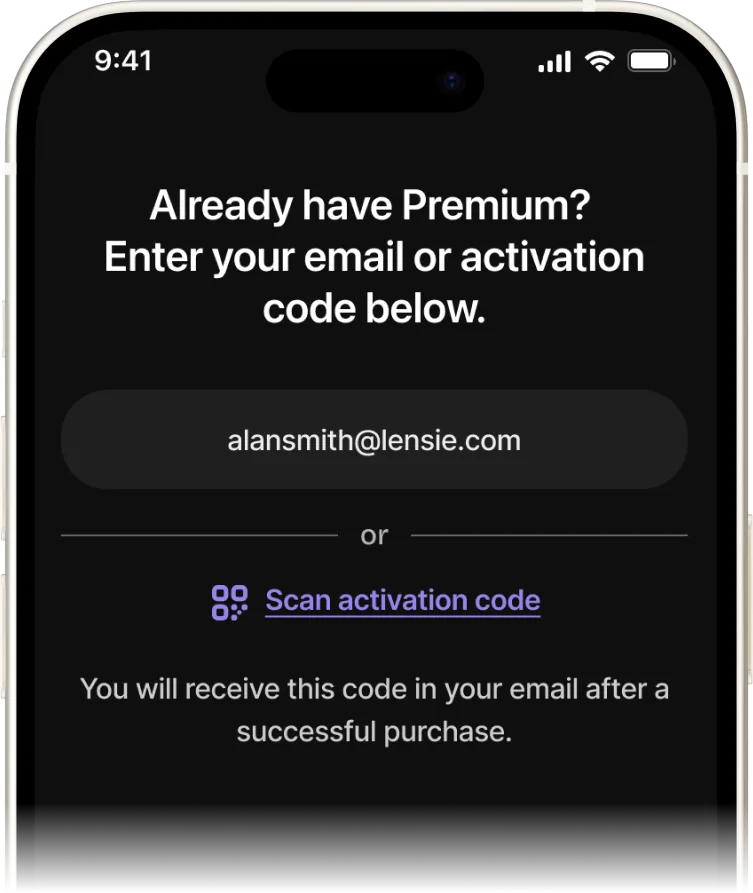
4Enter your checkout email and tap Activate.
I paid with the wrong email. How do I fix activation? +
We can move your Premium to the right address. Send us two things and we'll sort it out, normally within one business day:
- the email you want Premium on
- the email you actually paid with
Use the form at the bottom of this page and pick Activation as the topic, or write to us directly at the support address.
Billing & Payment
Renewals, cancellations and refunds.
How do I cancel my subscription? +
Message us and we'll cancel it for you. Once it's cancelled, no future renewals are charged, and you keep Premium until the end of the period you've already paid for. Nothing is cut off early.
If you're cancelling because you're within 6 days of purchase, say so in your message. You may also be eligible for a full refund.
Can I get a refund? +
Yes. A full refund within 6 days of purchase, for any reason. You don't need to justify it.
- Send us a refund request from the form below.
- We review it within 3 days.
- You get a confirmation within 48 hours of that review.
- The money reaches your account in 7 to 15 days, depending on your bank.
Renders & Styles
Getting your first image and video out of the app.
How do I make my first render? +
- Open Prompt Image from the tab bar.
- Tap a style preset. The prompt writes itself, and you can edit any word of it.
- Add a selfie if you want the render to look like you, then tap the arrow to generate.
Images land in about twelve seconds and arrive as four variations. Keep the one you like, remix it, upscale it to 4K, or push it into a 5-second video.
Why doesn't my render look like the style preview? +
Presets set the lighting, lens and grade. Your photo decides the rest. Three things move the result more than anything else:
- Face reference. One clear, front-facing, well-lit photo beats five dim or heavily filtered ones.
- What you left in the prompt. Wardrobe and background words override the preset. Delete what you don't want.
- Which variation you're looking at. Swipe all four before deciding. They can differ a lot.
The same prompt twice won't give the same frame either. That's expected. Lock a variation you like and remix from it rather than regenerating from scratch.
How long does a video take, and what does a credit cover? +
A clip renders in about 38 seconds at 5 seconds long, 30fps, up to 1080p. One clip costs one credit, whether you keep it or not, so preview your still first and animate the frame you actually want.
Images don't use video credits. Premium includes a monthly pool of credits that resets with your billing date.
My render failed or got stuck. Do I lose the credit? +
No. A render that fails or times out is not charged. If a credit was already deducted it returns automatically, usually within a few minutes.
Before retrying: keep the app open while it renders, and check your connection is stable. Backgrounding the app during a video render is the most common cause of a stuck job.
If a credit hasn't come back after an hour, message us with roughly when it happened and we'll restore it.
Where do my renders go, and can I use them commercially? +
Everything you generate is saved in Gallery and can be exported to Photos or Files at any time. Exports from a paid plan carry no watermark.
You own what you create. Premium covers personal and social use. If you're using renders for client work, ads or packaging, message us about commercial licensing and we'll point you at the right plan.
Privacy & Data
What happens to the photos and faces you upload.
Are my photos used to train your models? +
No. The photos you upload are used to produce your own renders and nothing else. They never enter a training set, and we don't use them for advertising.
Face models built from your selfies stay on your device unless you explicitly turn on cloud sync.
How long do you keep my uploads? +
Source photos are deleted automatically after 30 days. Your finished renders stay in your Gallery until you delete them, and deleting one removes it from our side too.
Want everything gone sooner? Ask us to delete your account and we'll wipe uploads, renders and face models. See the Privacy Policy for the full retention detail.
Do my renders show up publicly in Discovery? +
Only if you choose to share them. Renders are private by default. Premium also includes Private mode, which keeps everything you generate out of Discovery permanently, with no per-render decision to remember.
Is my data shared with anyone else? +
We use a small number of service providers to run the app: hosting, crash reporting, payments. They only receive what they need to do that job, under agreements that forbid using it for anything else.
We don't sell your data. The full list of providers is in the Privacy Policy.
Still stuck? Write to us.
Tell us what happened and what you expected instead. If it's about activation or a refund, include the email you paid with. It saves a round trip.